
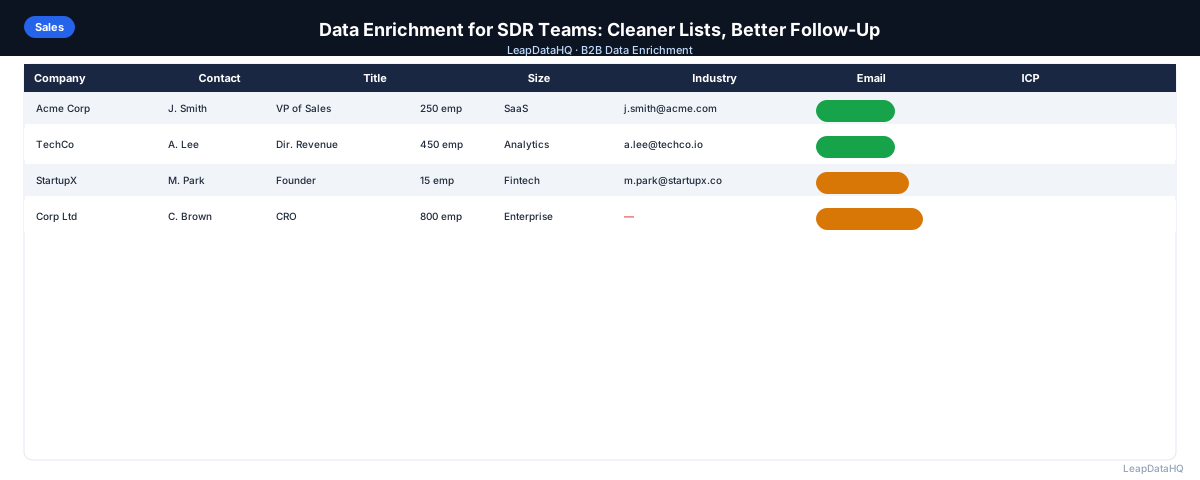
SDR teams are on the wrong side of a data quality problem. The prospecting workflows that fuel their activity targets — cold email sequences, call lists, LinkedIn outreach — only work when the contact data behind them is accurate. A list with missing emails, outdated titles, and wrong company data produces effort that doesn't convert.
Data enrichment addresses this by filling the specific fields SDR workflows depend on: work email addresses for sequences, job titles for personalization and ICP scoring, company size for territory assignment, and direct phone numbers for call-first workflows.
This guide covers how data enrichment fits into an SDR team's workflow: when to run it, what fields to prioritize, how to evaluate results, and how to connect enriched data to the sequences and CRM that SDRs actually use.
SDR teams are measured on activity metrics — emails sent, calls made, meetings booked — but these metrics measure effort, not effectiveness. The number of emails sent does not matter if the emails are sent to wrong or unverifiable addresses. The number of calls made does not matter if the contact list lacks phone numbers. Data enrichment is the step that connects activity volume to activity quality, ensuring that the outreach effort SDRs invest lands on contacts who are reachable, relevant, and properly personalized to.
Why SDR Teams Have Worse Data Problems Than They Realize
SDR prospecting data comes from multiple sources: CRM exports, Apollo or ZoomInfo exports, conference lists, LinkedIn exports, referrals from AEs. Each source has its own data quality characteristics and its own missing fields. When these sources get combined into a prospecting list without a quality pass, the result is a mixed-quality file where some contacts are outreach-ready and others are not.
The consequence SDRs notice most is reply rate — it's lower than expected. But the underlying cause is often that a significant fraction of the list couldn't be reached at all (missing emails), received poorly personalized messages (missing titles), or were the wrong people at the wrong companies (missing ICP qualification data). Enrichment fixes the upstream data that determines downstream results.
What Data Fields SDR Workflows Depend On
- Work email address: required for email sequences — contacts without email addresses generate zero email touchpoints
- Job title: required for personalization ("As a [title]...") and ICP qualification (is this person the right seniority?)
- Company name: required for personalization and account-based context
- Company size (headcount): required for territory assignment, pricing tier targeting, and ICP qualification
- Industry: required for vertical-specific messaging variations
- Direct phone number: required for call-first SDR workflows
- LinkedIn URL: required for LinkedIn outreach touchpoints in multi-channel sequences
Step 1: Build the Raw Prospect List
Assemble the raw list from whatever sources are in use: CRM export of assigned accounts, Apollo filter export, conference attendee list, inbound inquiry export. Combine into a single CSV. Don't worry about quality yet — the enrichment pass handles that. Do note the source of each row in a "source" column for tracking.
Step 2: Detect Missing Fields
Before enrichment, audit what's missing. Count blank cells in each key column. This tells you which fields to request from the enrichment tool. Don't request fields that are already populated across the full list — that wastes credits on redundant enrichment.
Step 3: Normalize and Clean Messy Columns
Before uploading for enrichment, clean the lookup key fields. Company domain: strip http://, www., trailing slashes. Name fields: TRIM() and PROPER(). Remove placeholder values in title and company fields. These cleaning steps take 15–20 minutes and directly improve the enrichment match rate.
Step 4: Enrich Contact and Company Data
Ready to enrich your CSV list?
Upload a CSV, fill missing data, review confidence scores, and export clean records.
Upload a CSV — Start EnrichingUpload the cleaned file to LeapDataHQ or your enrichment tool. Map columns. Request the fields your gap analysis identified as missing: email, title, company size, industry, phone, LinkedIn URL. Review the match rate and confidence distribution after processing. A 60%+ email match rate is typical for well-formatted SDR prospect lists.
Step 5: Review Confidence and Quality
Apply your confidence threshold. High-confidence enriched contacts go directly to the prospecting pipeline. Mid-confidence contacts are reviewed: do the enriched fields look plausible given the contact's other information? Low-confidence contacts are set aside for manual review or secondary enrichment.
Step 6: Fix Duplicates and Bad Rows
Deduplicate: one contact per email address. Remove role-based emails. Remove contacts outside ICP criteria based on enriched title and company size. Remove contacts already in active sequences from another SDR. This step shrinks the list but makes every remaining contact more valuable.
Step 7: Export and Load into Sequencer and CRM
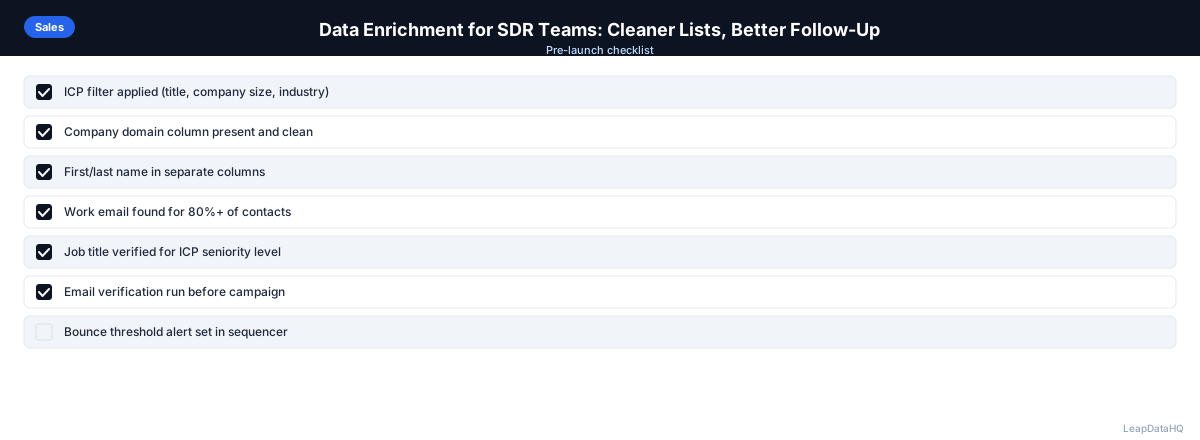
Export the enriched, cleaned list. Run email verification on all email addresses before loading into the sequencer. Map enriched fields to CRM properties during import so title, company size, and industry are available for lead scoring. Set bounce threshold alerts in the sequencer (pause at >2% hard bounces).
SDR Data Enrichment Checklist
- ☐ Raw list assembled with source column
- ☐ Gap analysis completed (blanks by column)
- ☐ Domain and name fields cleaned before enrichment
- ☐ Deduplication run before enrichment
- ☐ ICP pre-filter applied before enrichment (remove obvious mismatches)
- ☐ Enrichment run for missing fields only
- ☐ Confidence threshold applied
- ☐ Role-based addresses removed
- ☐ Email verification run on all email addresses
- ☐ CRM import with correct field mapping
- ☐ Lead scoring updated for enriched contacts
- ☐ Sequencer loaded with verified list, bounce threshold set
Common SDR Enrichment Workflow Mistakes
A common mistake is enriching the full CRM at once rather than enriching prospect lists as they are built. Full-CRM enrichment has its place in quarterly maintenance cycles, but for day-to-day SDR activity, per-list enrichment is more practical. Enriching a 500-contact prospect list takes minutes and delivers data for the contacts the SDR is actually working this week. Full-CRM enrichment is a separate project with different goals.
Another mistake is treating enrichment as a one-time add-on to the prospecting workflow rather than a standard step. SDR teams that enrich every list before it reaches the sequencer consistently outperform teams that enrich only when they notice a data problem. Making enrichment a non-optional step in the prospecting pipeline — enforced either by RevOps or by the team lead — ensures consistent list quality regardless of which SDR is running the sequence.
When to Use LeapDataHQ
LeapDataHQ fits SDR team workflows that run enrichment before each new prospecting batch. Upload a CSV from any source, fill missing email addresses, titles, and company fields, review with confidence scores, and export a clean file for email verification and sequencer loading. Credit-based pricing matches the irregular cadence of SDR prospecting — pay per enrichment batch, not per seat per month.
Start Enriching LeadsFrequently Asked Questions
How long does data enrichment take for a 500-contact SDR prospect list?
Enrichment processing takes a few minutes. The review step — applying confidence thresholds, checking data quality, running email verification — takes about 45–60 minutes. Budget 90 minutes total from upload to a sequence-ready file. After the first pass, repeat passes become faster as the workflow becomes familiar.
Should SDRs run enrichment themselves or have RevOps do it?
Either model works. In RevOps-managed enrichment, SDRs submit prospect lists to RevOps, who run the enrichment and quality checks and return a clean list. In SDR-managed enrichment, SDRs run the workflow themselves with minimal RevOps involvement. The SDR-managed model works better when the SDR team is larger and prospecting volume is high; RevOps-managed works better when enrichment quality needs tight control and RevOps has bandwidth.
Do SDRs need different enrichment fields than other sales roles?
SDR-specific priorities: email address (high priority for sequence loading), direct phone (for call-first workflows), LinkedIn URL (for multi-channel sequences). AE and enterprise sales priorities may additionally include company revenue, funding status, and technology stack data. The base enrichment fields (email, title, company size, industry) are universal; role-specific fields add on top of them.
How does data enrichment affect SDR activity metrics?
Enrichment improves the denominator of SDR metrics. More contacts with valid email addresses means more contacts can be enrolled in sequences. Better title data means better ICP filtering, so more enrolled contacts are actually target buyers. Both improvements raise activity quality without necessarily increasing raw activity volume.
What's the best way for SDR teams to track enrichment quality over time?
Track two metrics per prospecting batch: (1) enrichment match rate — what percentage of contacts got email addresses added; (2) post-campaign bounce rate — what percentage of enriched emails hard-bounced in the sequencer. A declining match rate suggests list source quality is deteriorating; a rising bounce rate suggests enrichment confidence thresholds need to be raised.