
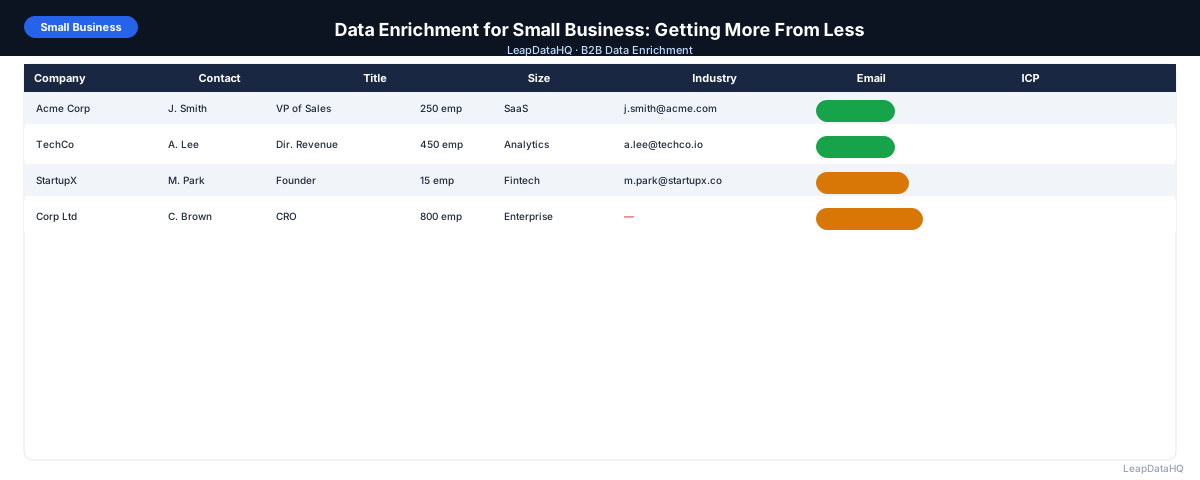
Small businesses often assume that sophisticated prospecting tools are only for large sales organizations with big budgets and dedicated ops teams. This assumption leads to manual research, inconsistent list quality, and outbound programs that struggle to scale.
Data enrichment doesn't have to be expensive or complex. For small businesses doing B2B outreach, the goal is simple: build a list of companies that match your customer profile, find the right people to reach, get their contact information, and reach them with a relevant message.
Enrichment makes that process faster, more accurate, and more consistent — without requiring enterprise contracts or technical setup. This guide covers how small businesses can use affordable enrichment tools to build better prospect lists and improve outbound results.
You'll learn what small businesses typically start with, how to choose the right enrichment tool, and a practical workflow for enrichment on a small business budget. Whether you're a solo founder doing your own prospecting or a small team of 2-3 people, these principles apply.
Why Small Businesses Need Data Enrichment
Small businesses doing B2B outreach face specific constraints: limited time for manual research, limited budget for expensive platforms, and limited team size to manage complex workflows. Without enrichment, the result is often one of two failure modes: building lists too slowly to generate enough pipeline, or building them quickly but with poor quality data that doesn't convert.
Enrichment solves the speed problem without sacrificing quality. Instead of spending a day manually looking up 200 emails, a small business can upload a CSV and get results in minutes — freeing time for follow-up, meetings, and the actual sales work. The cost of enrichment is a fraction of the cost of rep time spent on manual research.
For small businesses, enrichment is a force multiplier. It lets a team of 2-3 people prospect with the same data quality as a 20-person sales team, without the enterprise overhead. This levels the playing field in competitive B2B markets.
What This Means for Your Business
Data enrichment transforms your prospecting from a manual, time-intensive process to a systematic, scalable workflow. Instead of spending hours researching each contact, you can build enriched lists in minutes and focus your time on the high-value work: writing relevant outreach, having conversations, and closing deals.
For small businesses, the time savings are particularly valuable. Every hour spent on manual research is an hour not spent on revenue-generating activities. Enrichment automates the research, freeing you to focus on selling. This is especially important for founders and solo salespeople who are doing everything themselves.
The quality improvement is equally important. Manual research is inconsistent — you might spend 10 minutes on one contact and 2 minutes on another. Enrichment applies the same process to every contact, producing consistent data quality across your entire list. This consistency improves campaign performance and reduces bounces.
Who Should Use Enrichment as a Small Business
Data enrichment is valuable for any small business doing B2B outreach, regardless of industry or sales motion.
- Solo founders doing their own business development and prospecting
- Small sales teams of 2-5 people managing their own outreach
- Agencies providing lead generation services to clients
- Consultants and service providers building client prospect lists
- SaaS startups doing outbound to build their initial customer base
- Professional services firms (accounting, legal, marketing) targeting specific industries
- E-commerce companies doing B2B outreach to retail partners or resellers
If your small business sends B2B outreach to prospects and you're building lists manually, enrichment will improve your results. The investment is modest and the returns are immediate — better data quality, faster list building, and more time for selling.
What Small Businesses Typically Start With
Most small businesses start B2B prospecting with some combination of incomplete data sources. The starting point varies, but the challenge is the same: you need more complete data to do effective outreach.
- A list of target companies built from LinkedIn search, Google, or industry directories
- A few existing customer names as a reference for what your ICP looks like
- A spreadsheet with company names and maybe some domains, but no contact information
- A partially filled CRM from past sales activities
- Conference attendee lists or trade publication mentions
- Referrals from existing customers or partners
Enrichment takes any of these starting points and appends the missing data needed to start outreach. Whether you have company names, domains, or partial contact records, enrichment fills the gaps and produces outreach-ready data.
Choosing the Right Enrichment Tool as a Small Business
Small businesses have different requirements than enterprise teams. You need tools that match your budget, technical comfort level, and usage patterns.
- No annual contracts or large minimum commitments
- No developer required to set up or use
- Pay-per-use or credit-based pricing that scales with actual usage
- Simple CSV upload and download workflow
- Confidence signals to help you know what to trust
- Fast setup — you should be able to enrich your first list within an hour
Enterprise platforms with seat-based pricing and long-term contracts don't fit this profile. Lightweight, credit-based enrichment tools are designed for exactly this use case. They let you start small, scale as needed, and pay only for what you use.
A Small Business Enrichment Workflow
The enrichment workflow for small businesses is straightforward. You don't need complex integrations or dedicated ops resources. The process is: define your target, build a list, enrich it, review the results, and start outreach.
- Define your target: industry, company size, location, key job titles
- Build a list of target companies (LinkedIn search, Google search, directories)
- Add company domains to your spreadsheet
- Identify 1-2 decision-maker titles at each company using LinkedIn
- Upload to an enrichment tool (company domain + contact name)
- Review and filter to high-confidence results
- Export and load into your email tool or CRM
- Start outreach with enriched, verified data
Managing Costs on a Small Business Budget
Ready to enrich your CSV list?
Upload a CSV, fill missing data, review confidence scores, and export clean records.
Upload a CSV — Start EnrichingCredit-based enrichment lets you control costs by only enriching records you'll actually use. This is particularly important for small businesses with limited budgets. Key practices for budget management:
- Filter to ICP-fit companies before enriching contacts — don't pay to enrich contacts at companies you'll discard
- Enrich in batches sized to your actual outreach volume
- Re-use high-quality enriched lists across multiple follow-up campaigns rather than building a new list every month
- Track enrichment costs per campaign to understand your cost per contact and cost per reply
- Start with a small test batch to evaluate match rates before committing to larger volumes
Checklist: Small Business Enrichment Setup
Use this checklist when setting up enrichment for your small business:
- ICP is clearly defined (industry, company size, location, job titles)
- Target company list is built from reliable sources
- Company domains are added to the spreadsheet for all target companies
- Decision-maker titles are identified for each target company
- Enrichment tool is selected based on budget and workflow requirements
- Input CSV is cleaned and formatted correctly
- Enrichment is run on a small test batch first to evaluate match rates
- Results are filtered to high-confidence records before outreach
- Enriched data is loaded into email tool or CRM
- Enrichment costs are tracked per campaign for budget management
Common Mistakes to Avoid
- Trying to do all research manually to save money. Manual research is slow and inconsistent. The time cost of manual research far exceeds the cost of enrichment tools. For small businesses, time is the most valuable resource — don't waste it on tasks that can be automated.
- Choosing enterprise tools with annual contracts. Small businesses need flexibility. Credit-based tools let you scale up and down based on actual needs without committing to expensive contracts you may not fully use.
- Enriching all contacts without ICP filtering. Enrichment credits are wasted on contacts at companies outside your target market. Define your ICP and filter before enriching to focus your budget on the right targets.
- Not reviewing confidence scores before outreach. Low-confidence results are more likely to bounce or be inaccurate. Filter to high-confidence records to protect your sender reputation and improve campaign results.
- Building lists once and never updating them. Contact data decays over time. Re-enrich your lists quarterly to catch job changes and company updates. This prevents outreach to outdated contacts.
- Not tracking enrichment ROI. Without tracking cost per contact and cost per reply, you can't evaluate whether enrichment is delivering value. Track these metrics to optimize your enrichment workflow over time.
- Skipping email verification after enrichment. Enriched emails should be verified before sending. Confidence scores indicate pattern accuracy, not live deliverability. Verification catches closed mailboxes and inactive domains.
- Not re-using enriched lists. High-quality enriched lists are valuable assets. Use them across multiple campaigns and follow-up sequences rather than building a new list every month. This maximizes the value of your enrichment investment.
Practical Examples
Example 1: Solo Founder Building Initial Prospect List
A solo founder building a first prospect list might identify target companies from LinkedIn searches, add domains, and use enrichment to find decision-maker emails. Filtering to high-confidence results produces a smaller but outreach-ready list and avoids the hours of manual research that building it by hand would require.
Example 2: Small Marketing Agency Enriching Client Lists
A small marketing agency enriching lists for several clients can run separate batches for each client from one account, keeping client data isolated. Credit-based pricing means the agency pays per list rather than committing to a seat-based contract, which suits intermittent client work.
Example 3: Consulting Firm Targeting Specific Industries
A consulting firm targeting a specific industry can build a list from directories, enrich it to surface company size and decision-maker contacts, then filter to companies matching its ICP before enriching individual contacts. The resulting list becomes the foundation for a focused outbound program.
Example 4: E-Commerce Company Finding B2B Partners
An e-commerce company selling office supplies wanted to reach office managers at B2B companies. They built a list of 300 companies, enriched for office manager contacts, and filtered to companies with 20-200 employees. The enriched list of 180 contacts became their B2B outreach campaign, generating 12 new wholesale accounts in the first quarter.
Example 5: Professional Services Firm Re-Enriching Old List
An accounting firm had a list of 250 contacts from 18 months ago. Before re-engaging, they re-enriched the list to check current emails and job titles. 30% of contacts had changed jobs. After re-enrichment, they had 175 current contacts ready for outreach. This prevented bounced emails and outdated messaging.
How LeapDataHQ Helps
LeapDataHQ is designed for exactly the small business use case: no developer required, no annual contract, CSV upload and download, credit-based pricing. Upload a list of target companies and contacts, get email addresses and company data back, review confidence scores, and export. The entire workflow can be completed in under an hour.
For small business owners, solo salespeople, and small teams doing B2B outreach without a dedicated sales ops function, LeapDataHQ provides enterprise-quality enrichment at a price and complexity level that makes sense. You pay only for what you enrich, with no monthly seat fees or minimum commitments.
The credit-based model is particularly valuable for small businesses with variable prospecting needs. Enrich 200 contacts one month, 500 the next, and 100 the month after — you pay only for what you use. No wasted spend on unused capacity or expensive contracts you can't afford.
Next Steps
If you're a small business doing B2B outreach, start by defining your ICP and building a target company list. Then use enrichment to fill in missing contact data and company information. LeapDataHQ provides affordable, flexible enrichment designed for small business workflows. Check our /features and /pricing to see if it fits your needs.
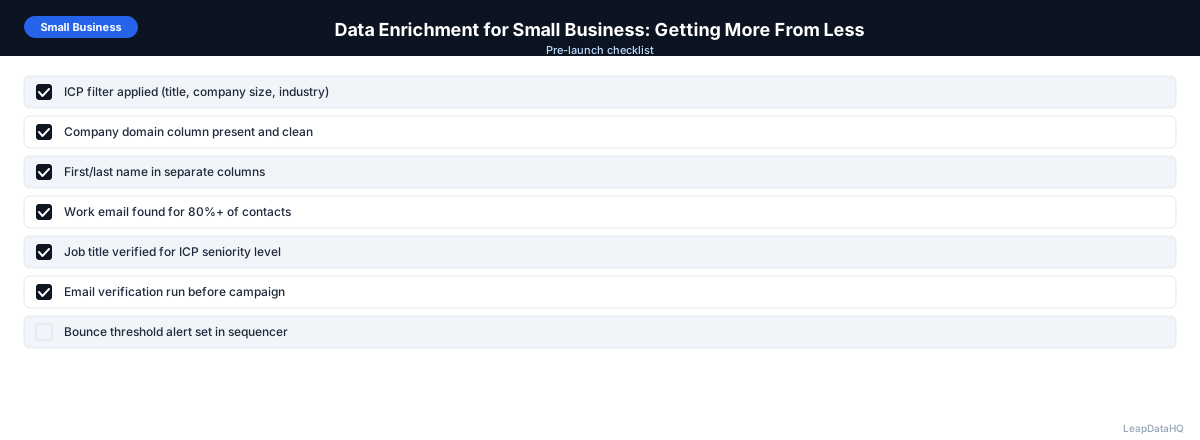
When to Use LeapDataHQ
LeapDataHQ is designed for exactly the small business use case: no developer required, no annual contract, CSV upload and download, credit-based pricing. Upload a list of target companies and contacts, get email addresses and company data back, review confidence scores, and export.
For small business owners, solo salespeople, and small teams doing B2B outreach without a dedicated sales ops function, LeapDataHQ provides enterprise-quality enrichment at a price and complexity level that makes sense. The credit-based pricing means you pay only for what you enrich, making it practical to scale enrichment with your prospecting activity.
The workflow is simple enough for non-technical users: upload a CSV, map your columns, review results, and export. No API integration, no developer setup, no complex configuration. You can enrich your first list within an hour of signing up.
For small businesses managing costs carefully, LeapDataHQ's transparency is valuable. You see exactly how many credits each enrichment costs, and you can track enrichment spend per campaign. This makes it easy to evaluate ROI and optimize your enrichment workflow over time.
Start Enriching LeadsFrequently Asked Questions
How much does B2B data enrichment cost for a small business?
Credit-based enrichment tools typically charge a few cents to a few dollars per enriched record depending on the data fields returned. For a small business enriching 100-500 records per month, costs are manageable — often $20-100 per month depending on volume and tool. The ROI is clear when you compare to rep time saved on manual research.
Do I need any technical skills to use a CSV enrichment tool?
No. CSV enrichment tools are designed for non-technical users. You upload a spreadsheet, map the columns (which column is the company name, which is the first name, etc.), and download the result. No API integration or coding required. If you can use a spreadsheet, you can use an enrichment tool.
Is enrichment worth it if I'm only doing outreach to 50 companies?
Yes, if those 50 companies are the right targets and you're missing email addresses or company data. The time you save on manual research for even a small list justifies the cost, and the improved data quality improves your reply rate. For high-value targets, enrichment is always worth the investment.
What's the minimum list size where enrichment starts making sense?
There's no hard minimum. Even 20-30 records are worth enriching if they're high-value targets. The ROI calculation is simple: what would manual research cost in time versus what enrichment costs per record? For most small businesses, enrichment pays for itself within the first campaign.
Can small businesses use the same enrichment tools as enterprise teams?
Some tools serve both markets. Look for tools with flexible pricing (credit-based rather than seat-based) and no minimum commitment. Enterprise-focused tools often have minimum contracts that make them impractical for small businesses. Credit-based tools are designed for the small business usage pattern.
How do I evaluate whether enrichment is delivering ROI?
Track cost per enriched contact, time saved versus manual research, bounce rates on campaigns using enriched data, and reply rates. Compare these metrics to your previous manual research process. For most small businesses, the time savings alone justify the cost within the first month.
What if enrichment doesn't find emails for all my targets?
Match rates of 60-80% are typical for email enrichment. Not every company has publicly discoverable contacts. For high-value targets that don't match, supplement with manual research on LinkedIn or company websites. Enrichment handles the bulk; manual research fills the gaps for priority targets.