
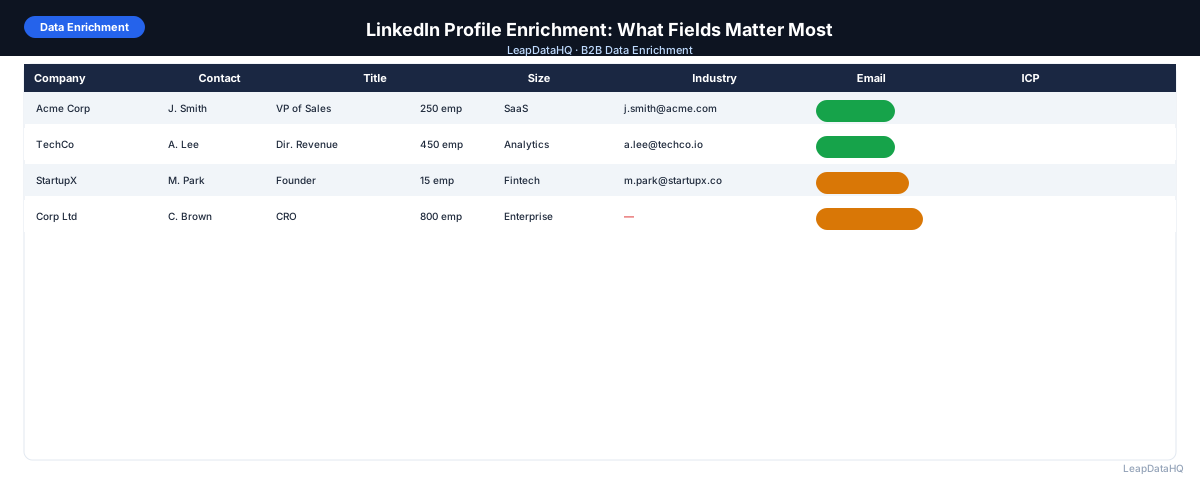
LinkedIn is the most reliable source of B2B professional data. You can find decision makers by title, filter by company size and industry, and identify exactly who fits your ideal customer profile. But LinkedIn has a deliberate limitation: it doesn't share email addresses or direct phone numbers in exports. The platform wants communication to happen through LinkedIn, not outside it.
LinkedIn profile enrichment solves this. By taking the name, company, and title data you get from LinkedIn and running it through an enrichment tool, you can append the email addresses, direct phone numbers, and additional company context you need to reach those contacts outside the platform.
This guide covers which LinkedIn fields matter most for enrichment, how to get the best results from a LinkedIn export, and how to build a LinkedIn enrichment workflow that scales.
The value of LinkedIn enrichment goes beyond simply finding email addresses. When you enrich a LinkedIn export, you also gain company firmographics — size, industry, revenue range — that LinkedIn's search filters surface but don't export as data columns. These additional fields enable richer segmentation, more targeted messaging, and better ICP filtering after export. A LinkedIn search might identify 500 contacts that fit your title criteria, but it's only after enrichment that you can filter those 500 to the 200 that are at companies in your target size range and industry.
For teams that use LinkedIn as their primary prospecting source — SDRs, recruiters, agency business developers — enrichment transforms LinkedIn from a research platform into a lead generation engine. The combination of LinkedIn's precise targeting capabilities and enrichment's data completion creates a workflow that produces ready-to-use outreach lists with minimal manual effort. The key is building a repeatable process that handles the common friction points: company domain lookup, name standardization, and post-enrichment review.
What LinkedIn Exports Include
LinkedIn's standard connection export includes: first name, last name, email address (only if the connection has enabled sharing), company name, position, and connected date. The email address is often blank because most LinkedIn users don't enable this sharing setting.
Sales Navigator lead exports include: first name, last name, title, company name, location, LinkedIn profile URL, and in some cases, phone number if verified. Email addresses are not included.
What's missing from both: work email address, direct phone number, company domain (usually), company size and industry (sometimes), and any real contact information outside LinkedIn.
The Most Important Fields for LinkedIn Enrichment
Work Email Address (Highest Priority)
Email is the most commonly needed field after a LinkedIn export. Work email addresses enable cold outreach via email sequences, CRM import, and marketing automation — all of which are more scalable than LinkedIn InMail.
Company Domain
The company domain is required for email enrichment tools to accurately find work emails. LinkedIn exports give you company names but not domains. Adding the domain column (usually by searching the company name) is a necessary preparation step before enrichment.
Direct Phone Number
For sales roles where phone outreach is part of the workflow, direct dials are valuable. Enrichment tools can append direct phone numbers alongside email addresses, though match rates for direct dials are generally lower than for email.
Company Size and Industry
Company size and industry are available in LinkedIn's filters but aren't always included in exports. Enriching these fields enables ICP filtering after export and powers segmentation in your CRM or sequencer.
Seniority Level
Seniority level (VP, Director, Manager, IC) can be derived from title but isn't always explicit. Some enrichment tools return a normalized seniority classification that makes filtering and segmentation more reliable than pattern-matching titles manually.
How to Prepare a LinkedIn Export for Enrichment
- Export your LinkedIn connection list or Sales Navigator lead list as CSV
- Add a Company Domain column — for each company, find and enter the website domain
- For Sales Navigator exports, verify the company name is the correct legal entity (not a division or subsidiary)
- Standardize name fields: split full names into first name and last name columns if combined
- Remove LinkedIn connections who are personal contacts not relevant to your outreach
- Remove duplicate rows (same person appearing from multiple saved searches)
- Format the file: UTF-8 CSV, no merged cells, clear column headers
Ready to enrich your CSV list?
Upload a CSV, fill missing data, review confidence scores, and export clean records.
Upload a CSV — Start EnrichingGetting the Best Match Rates From LinkedIn Enrichment
Match rates for LinkedIn enrichment depend heavily on input quality:
- Domain included: match rates are 20–30% higher when domain is included vs. company name only
- Name accuracy: middle names, nicknames, or misspellings reduce match rates
- LinkedIn URL included: including the contact's LinkedIn profile URL significantly improves accuracy for some tools
- Company type: established companies (100+ employees) have higher match rates than very small businesses
- Geography: US and UK contacts have higher match rates than contacts in markets with less data coverage
After Enrichment: What to Do With LinkedIn-Sourced Contacts
Once enriched, your LinkedIn-sourced contacts are ready for:
- Email outreach sequences: more effective than LinkedIn InMail at scale
- CRM import: build your pipeline from LinkedIn-sourced leads
- Account-based campaigns: match enriched contacts to target account lists
- Segmentation: use company size, industry, and title to create targeted message variants
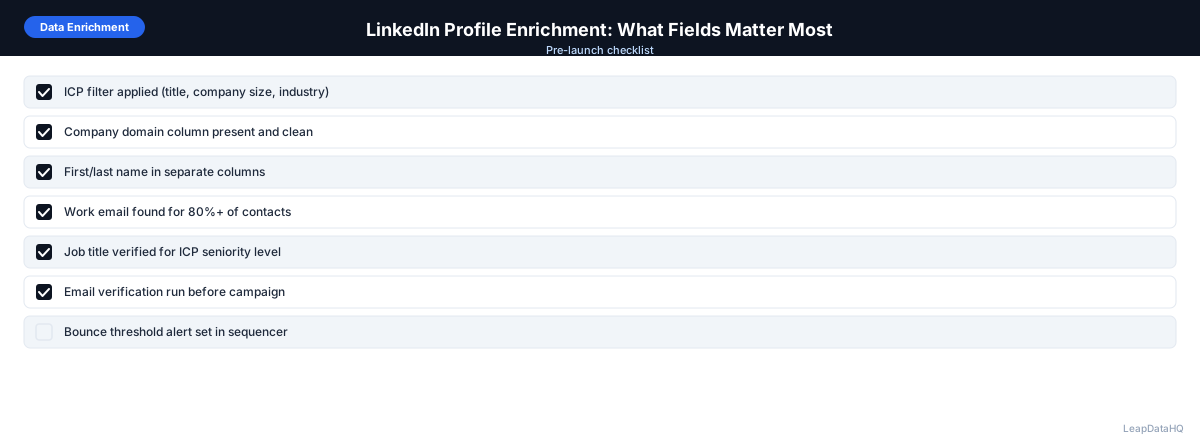
LinkedIn Profile Enrichment Checklist
- LinkedIn export obtained (connection export or Sales Navigator lead export)
- Company domain column added for all contacts
- First and last name in separate columns
- Duplicate rows removed
- Personal connections not relevant to outreach removed
- Uploaded to enrichment tool with domain and name columns mapped
- Results reviewed — confidence scores checked
- High-confidence results exported
- Email addresses verified before outreach
- List segmented by title, company size, or industry
LinkedIn Enrichment Compliance Notes
Use LinkedIn exports that you've obtained through official LinkedIn features — connection exports and Sales Navigator lead exports. Do not use automated scraping tools that violate LinkedIn's Terms of Service. Enrichment of legitimately-obtained export data using third-party data providers is standard B2B practice.
For GDPR compliance when enriching European contacts: ensure your outreach uses legitimate interest as the legal basis, include a clear opt-out option in all communications, and document your data processing activities.
Handling Large LinkedIn Exports Efficiently
When working with large LinkedIn exports — for example, a Sales Navigator list of 2,000+ contacts from multiple saved searches — efficiency matters. The preparation phase (adding company domains, standardizing names, cleaning the file) can take longer than the enrichment itself if not managed well. For large lists, batch the work: process 200-300 contacts at a time, reviewing results between batches to catch any issues early before processing the full list.
Another efficiency strategy is to pre-filter your LinkedIn export before enrichment. Apply ICP criteria that you can determine without enrichment — for example, remove contacts at companies you know are too small or in the wrong industry, remove roles that are clearly below your target seniority level, and remove any entries that lack a clear company association. This pre-filtering reduces the number of records sent to enrichment, saving credits and processing time while ensuring enrichment effort is focused on the most promising contacts.
Match Rate Expectations by Industry and Role
Match rates for LinkedIn enrichment vary significantly by the characteristics of the contacts being enriched. For contacts at established technology companies (100+ employees, US-based, with public web presence), email match rates of 60-75% are realistic. Contacts at professional services firms, healthcare organizations, and government entities tend to have lower match rates because these organizations publish less contact data publicly. Contacts at very small businesses (under 20 employees) also have lower match rates because these companies often lack consistent email patterns across employees.
Role-based variation also affects match rates. Senior executives (CEO, CTO, VP) tend to have the highest match rates because their contact information is more widely published and cross-referenced across multiple sources. Mid-level managers and individual contributors have lower match rates, particularly at larger companies where their specific role may not be publicly associated with their email address. Understanding these patterns helps you set realistic expectations for enrichment output and plan your campaign volume accordingly — if you know a specific target segment historically matches at 40%, you need to start with more raw contacts to reach your outreach volume target.
When to Use LeapDataHQ
LeapDataHQ fits naturally into the LinkedIn enrichment workflow. After exporting from LinkedIn or Sales Navigator and adding company domains, upload to LeapDataHQ to append email addresses, phone numbers, and company data. Review confidence scores, filter to reliable results, and export for outreach or CRM import.
This is a practical workflow for SDRs, recruiters, and agency professionals who regularly use LinkedIn for prospect or candidate identification but need to reach those people outside the platform.
Start Enriching LeadsFrequently Asked Questions
Can I get emails directly from LinkedIn without enrichment?
LinkedIn only shares email addresses in exports for connections who have explicitly enabled email sharing in their privacy settings. This is a small minority of users. For most LinkedIn contacts, you need an enrichment tool to find their work email address.
Is it legal to enrich LinkedIn export data with work emails?
Yes. Taking a LinkedIn export you legitimately obtained and using a third-party data provider to find publicly available work email addresses is standard B2B practice. What's not permitted is automated scraping of LinkedIn in violation of their terms. Use official LinkedIn export features and work with legitimate enrichment providers.
What's a realistic email match rate for LinkedIn exports?
For Sales Navigator exports of established B2B contacts with company domains included, expect 50–75% email match rates. Match rates are lower for contacts at very small companies, non-English-speaking international markets, and industries with limited public contact data.
Should I include the LinkedIn profile URL in my enrichment input?
Yes when available. Some enrichment tools use the LinkedIn URL as a verification signal to confirm the contact's association with the company, which improves email match accuracy. Include it in your upload if your export includes it.
How do I add company domains to a LinkedIn export?
For smaller lists (under 50 companies), search each company name and find their website URL. For larger lists, use a company name-to-domain lookup tool, or search each company on LinkedIn and note the website from the company page. Domain is the most important field for email enrichment accuracy.