
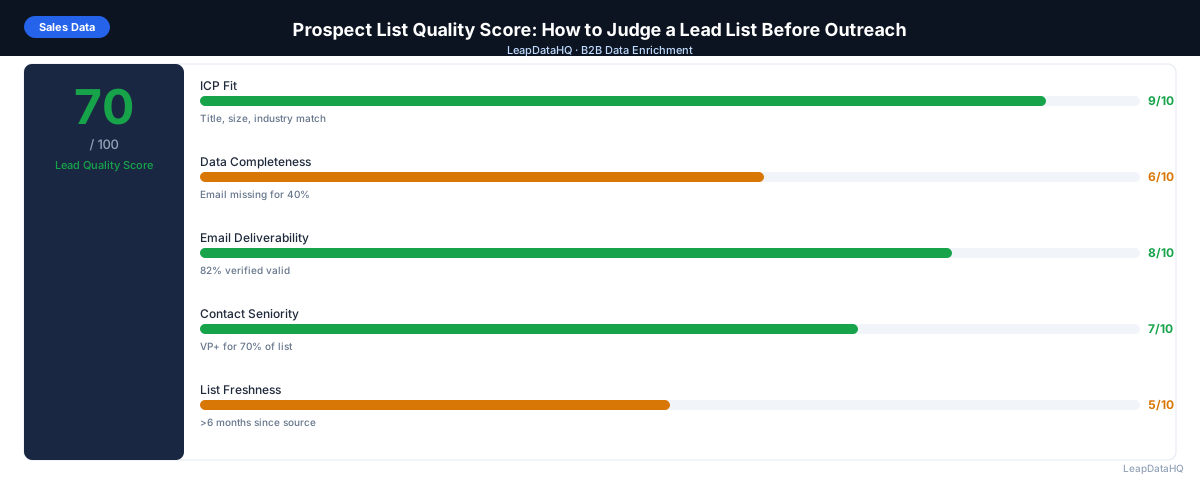
Not all prospect lists are equal. A list of 500 contacts might look substantial on paper but be only 60% usable for outreach once you remove contacts with invalid emails, missing titles, and ICP mismatches. A smaller list of 150 highly targeted, well-enriched contacts often outperforms the larger raw list.
A prospect list quality score is a structured way to evaluate how usable a list is before you load it into your outreach workflow. Rather than discovering problems after launch (through bounces, low reply rates, and bad CRM data), you assess them upfront and address gaps before they affect results.
This guide walks through a practical scoring framework for evaluating prospect list quality, what each dimension measures, and how to use the score to prioritize cleanup work.
The value of a quality score is not just in the number itself but in making the assessment process objective and repeatable. When different team members or clients evaluate the same list, a structured scoring system ensures everyone reaches the same conclusion about its readiness. Without a score, one person might look at a list and call it ready while another flags it as needing work — and neither can point to a clear standard to resolve the disagreement.
Why Scoring List Quality Before Outreach Matters
A quality score makes list quality visible and actionable. Without it, list evaluation is subjective — someone eyeballs the file, says "looks fine," and the campaign launches with hidden problems. A structured score surfaces specific gaps (30% of contacts are missing email addresses, 15% fail ICP filter) that can be addressed before they matter.
Quality scoring also helps when receiving lists from others — clients, data vendors, or other team members. Instead of taking a list at face value, you run it through your scoring framework and get an objective assessment of what needs to be fixed before use.
The Five Quality Dimensions
Dimension 1: Email Completeness and Validity (0–25 points)
The most critical dimension for email outreach. Score based on what percentage of contacts have valid, verified email addresses:
- 25 points: 90%+ of contacts have verified-valid email addresses
- 20 points: 75–89% have verified-valid emails
- 15 points: 60–74% have verified-valid emails
- 10 points: 40–59% have verified-valid emails
- 5 points: under 40% have verified-valid emails
Dimension 2: ICP Fit (0–25 points)
How well does the list match your Ideal Customer Profile? Score based on what percentage of contacts pass your ICP filters (title level, company size, industry, geography):
- 25 points: 90%+ pass ICP filter
- 20 points: 75–89% pass
- 15 points: 60–74% pass
- 10 points: 40–59% pass
- 5 points: under 40% pass
Dimension 3: Contact Completeness (0–20 points)
Are the key personalization fields populated? Score based on percentage of contacts with both job title and company name populated:
- 20 points: 90%+ have title and company name
- 15 points: 75–89% have both
- 10 points: 60–74% have both
- 5 points: under 60% have both
Dimension 4: Data Freshness (0–15 points)
Ready to enrich your CSV list?
Upload a CSV, fill missing data, review confidence scores, and export clean records.
Upload a CSV — Start EnrichingHow recently was this data collected or verified? Score based on estimated data age:
- 15 points: data sourced or verified within the past 30 days
- 12 points: sourced or verified within the past 90 days
- 8 points: sourced within the past 6 months
- 4 points: data is 6–12 months old
- 0 points: data is over 12 months old with no re-verification
Dimension 5: List Hygiene (0–15 points)
How clean is the file from a structural perspective? Score based on hygiene issues present:
- 15 points: no duplicates, no role-based emails, consistent formatting
- 12 points: under 5% duplicates or minor formatting issues, no role-based emails
- 8 points: 5–10% duplicates or some formatting inconsistencies
- 4 points: significant duplicates, role-based emails, or formatting problems
- 0 points: multiple severe hygiene problems requiring full cleanup before use
Interpreting the Total Score (0–100)
- 85–100: List is outreach-ready. Minor gaps won't materially affect campaign performance. Proceed with enrichment for missing fields and standard email verification.
- 70–84: Good list with specific gaps. Address the dimensions scoring below 15 points before launch. Likely needs enrichment or additional verification on specific segments.
- 55–69: Acceptable list that needs work. Plan 1–2 days of cleanup before campaign launch. Prioritize email validity (Dimension 1) and ICP fit (Dimension 2) first.
- 40–54: Below-average list. Consider whether the cleanup investment is worth it compared to rebuilding the list from a higher-quality source. If proceeding, plan a full enrichment and verification pass.
- Under 40: Low-quality list. Significant work needed. Evaluate whether the contacts themselves are worth the enrichment cost, or whether the list should be replaced.
How to Run a Prospect List Quality Assessment
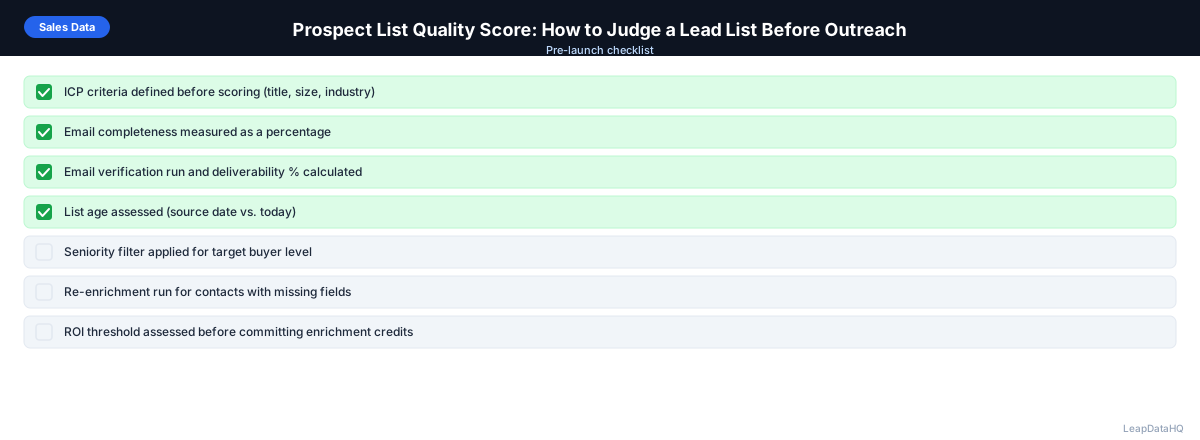
- Step 1: Upload the list to a spreadsheet. Count blank cells in email, title, and company name columns.
- Step 2: Apply ICP filter using available fields (title, company size, industry). Count passing rows.
- Step 3: Run email verification on all addresses present. Count valid, invalid, catch-all.
- Step 4: Check for duplicates on email column. Count duplicates.
- Step 5: Score each dimension using the framework above.
- Step 6: Calculate total score and identify the lowest-scoring dimensions to address first.
- Step 7: Run enrichment on gaps identified by scoring. Re-score after enrichment to confirm improvement.
Common Quality Problems by Score Dimension
Low email completeness (Dimension 1): run enrichment to find missing email addresses. Low ICP fit (Dimension 2): apply tighter source filters when building future lists. Low contact completeness (Dimension 3): enrich titles and company names. Low freshness (Dimension 4): re-verify and re-enrich before using old lists. Low hygiene (Dimension 5): deduplicate and remove role-based emails before enrichment.
Using Quality Scores to Compare Lists
One of the most practical uses of a quality score is comparing lists from different sources or different time periods. A data vendor's list scoring 45 and an internally built list scoring 72 tells you that the internal list is significantly more outreach-ready without needing to scrutinize every row. Over time, tracking quality scores across lists helps identify patterns — which sourcing channels produce the highest-quality contacts, which enrichment tools improve scores the most, and which team members consistently produce the best-prepared lists.
Quality scores also serve as a communication tool with stakeholders. When a campaign launch is delayed because the list scored 55 and needs enrichment, showing the five-dimensional score breakdown explains the decision objectively. The score replaces subjective judgment with a transparent, repeatable assessment that different team members can apply consistently across different lists and campaigns.
When to Use LeapDataHQ
Use LeapDataHQ to improve your prospect list quality score in two specific areas: email completeness (Dimension 1 — finding missing emails) and contact completeness (Dimension 3 — filling blank job titles and company names). Upload your list, run enrichment, and re-score to see how much the completeness dimensions improved.
Pair with a dedicated email verification tool to fully address Dimension 1, and use your own ICP filters to score Dimension 2 after enrichment has populated the fields needed for ICP qualification.
Start Enriching LeadsFrequently Asked Questions
How do I score a list I received from a vendor?
Run the same scoring framework regardless of source. Vendors claiming their lists are "verified" or "high-quality" may be using different standards than yours. A structured quality score gives you an objective assessment before you pay for outreach or load bad data into your CRM. If the score is low, negotiate with the vendor for replacement contacts or a partial refund.
Should I score a list before or after enrichment?
Score before enrichment to establish baseline quality, and after enrichment to measure improvement. The pre-enrichment score tells you what you're starting with. The post-enrichment score tells you whether the enrichment investment was worth it and what the final list quality is before campaign launch.
What's a good target score for a cold email campaign?
Aim for 70+ before launching a campaign. Score 85+ for highly targeted campaigns where each contact requires significant outreach investment (executive prospecting, strategic accounts). For high-volume, lower-touch sequences, 65–70 may be acceptable if you have strong list hygiene and email verification in place.
How does list quality score relate to expected campaign performance?
Higher quality scores correlate with lower bounce rates and higher reply rates — but the relationship isn't linear. A list scoring 90 doesn't necessarily outperform one scoring 75 if the lower-scored list has better targeting. Quality score measures the floor of what's possible — a bad list can't be saved by good copy, but a good list still needs good copy and targeting.
Can I automate the quality scoring process?
Partially. Email verification scores (Dimension 1), completeness counts (Dimension 3), and hygiene checks (Dimension 5) can be automated with tools and spreadsheet formulas. ICP fit scoring (Dimension 2) requires defining your ICP criteria and applying filters — automatable with your tools if criteria are defined. Data freshness (Dimension 4) requires knowing when the data was sourced — harder to automate but often available from list metadata.