
Sales teams spend a disproportionate amount of time on activities that aren't selling. Manual research — looking up email addresses, verifying company data, identifying decision-maker titles — can consume hours of an SDR's week. Those are hours not spent on outreach, follow-ups, and conversations that generate pipeline.
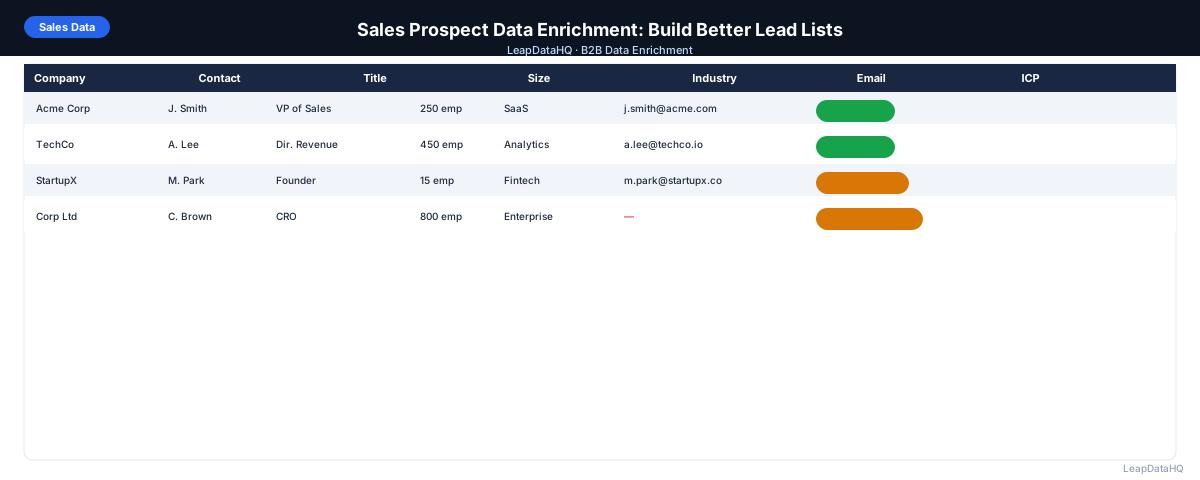
Sales prospect data enrichment shifts that balance. Instead of researching contacts manually, you upload a list and get the data you need appended automatically. Email addresses, direct phone numbers, job titles, company size, industry — all returned in a file ready to import into your CRM or email sequencer.
The result is more time for actual selling, better data quality for personalization, and a more consistent process that doesn't depend on each rep's individual research habits. This guide covers how to build a sales prospect enrichment workflow that improves output quality and reclaims rep time.
The core insight behind sales prospect enrichment is that most B2B contact data already exists somewhere — it just is not in your spreadsheet. A person's work email follows their company's domain pattern. Their job title is on LinkedIn. Their company size and industry are on Crunchbase, ZoomInfo, or other firmographic databases. Enrichment is the process of programmatically connecting your partial records to these existing data sources rather than having a person visit each site individually.
The efficiency gain is multiplicative. A manual researcher might look up 20 email addresses per hour if they are fast and efficient. An enrichment tool processes thousands of records in minutes. The comparison is not close — enrichment replaces hours of repetitive work with minutes of file preparation and review. The time saved compounds with every list enriched, making it one of the highest-ROI changes a sales team can make to their prospecting workflow.
What Sales Prospect Data Enrichment Adds
- Work email addresses: the most commonly missing field in prospect lists
- Direct phone numbers: useful for SDRs doing combined email and phone outreach
- Job title and department: confirms you've found the right person
- Seniority level: validates the contact against your buyer persona requirements
- Company size (headcount): enables ICP filtering and deal-size estimation
- Industry: enables industry-specific messaging and segmentation
- Technology stack: powers product-led personalization for tools with integrations
- Revenue range: informs deal-size expectations and qualification criteria
When to Enrich Sales Prospect Data
- Before a new outreach campaign: enrich the prospect list before loading into your sequencer
- After event attendance: enrich conference or webinar attendee lists with contact data
- After LinkedIn prospecting: enrich Sales Navigator exports with work emails
- Before CRM import: enrich new contacts before they enter your CRM
- Quarterly CRM maintenance: re-enrich existing contacts to catch job changes
- After a list purchase: enrich and verify before any purchased list is used
The Sales Prospect Enrichment Workflow
Step 1: Build Your Target Company and Contact List
Define your ICP and build a list of target companies and contacts. Use LinkedIn for title-based contact identification. Use Crunchbase, G2, conference directories, or your CRM for company lists. Focus on quality over quantity: a well-targeted list of 300 contacts outperforms an untargeted list of 3,000.
Step 2: Prepare Your Input File
Organize your list in a spreadsheet with: company domain, first name, last name, and job title (optional). Clean the data: remove duplicates, standardize domain format (no http:// prefix), verify names are in separate first/last columns. The quality of your input directly affects your enrichment match rate.
Step 3: Run Enrichment
Upload to your enrichment tool and map columns. Run enrichment and review the results: check overall match rate, confidence distribution, and spot-check a sample of returned emails. Filter to high-confidence records before exporting.
Step 4: Verify Emails
Run the enriched email list through an email verification tool. Remove invalid addresses and flag catch-all domains. This step protects your sender reputation and keeps bounce rates under the 2% threshold that triggers deliverability problems.
Step 5: Segment and Personalize
Ready to enrich your CSV list?
Upload a CSV, fill missing data, review confidence scores, and export clean records.
Upload a CSV — Start EnrichingUse the enriched company and contact data to segment your list before outreach. Even basic segmentation by industry or company size allows you to write messaging that's more relevant to each group. Import each segment into your sequencer as a separate campaign with tailored messaging.
Using Enriched Data for Better Personalization
Enrichment data enables personalization that goes beyond first name and company:
- Company size: "I noticed [Company] has scaled to around 200 people recently" — only possible with headcount data
- Industry: use industry-specific pain points and examples rather than generic messaging
- Tech stack: "Since you're already on Salesforce..." — only possible with technographic data
- Seniority: tailor your call to action to the decision-making level of the contact
- Revenue tier: reference company stage and scale in your value proposition
Measuring the Impact of Enrichment on Sales Performance
Track these metrics before and after implementing an enrichment workflow:
- Email bounce rate: should decrease significantly with enrichment + verification
- Reply rate: should improve with better targeting and personalization from enriched data
- Time to first outreach: should decrease when email research is automated
- SDR research time per week: should decrease as enrichment replaces manual lookup
- Data completeness in CRM: percentage of contacts with all required fields populated
Sales Prospect Enrichment Checklist
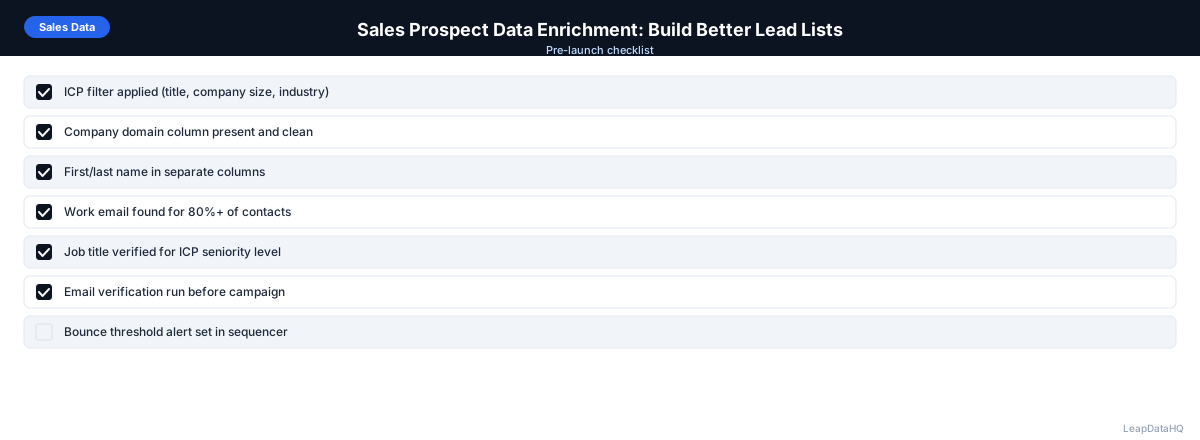
- ICP clearly defined before building prospect list
- Input file prepared: domain, first name, last name in separate columns
- Duplicates removed from input
- Enrichment run with correct column mapping
- Results reviewed: match rate and confidence scores checked
- High-confidence filter applied before export
- Emails verified before importing to outreach tool
- List segmented by company size, industry, or title
- Separate sequences created for each segment
- Bounce rate monitored after campaign launch
Choosing the Right Enrichment Fields for Your Workflow
Not every prospect list needs every enrichment field. The fields you choose should match your outreach channel and your personalization strategy. For a cold email campaign, work email is the essential field — everything else is secondary. For a phone-heavy outbound team, direct dial enrichment is worth paying more for. For account-based marketing campaigns, company firmographics like industry, company size, and tech stack are as important as individual contact data because they inform the account-level targeting and messaging strategy.
A good rule of thumb is to start with the minimum fields needed for your campaign type and add fields only when you have a specific use for them. Enriching for fields you do not use wastes credits and slows down the review process because you have more columns to inspect. If you need additional fields later, you can always re-enrich specific records rather than paying for full enrichment of every field on every contact.
Common Challenges in Sales Prospect Enrichment
The most common challenge sales teams face with enrichment is inconsistent match rates across different segments of their target market. A single enrichment run on a mixed list of enterprise and SMB contacts may show acceptable overall match rate while masking poor performance on one segment. For example, the enterprise contacts might match at 80% while the SMB contacts match at only 30%, and the blended rate of 65% looks fine. Breaking down match rates by segment — company size, industry, geography — reveals where enrichment works best and where gaps remain that need manual attention.
Another challenge is data freshness. Enriched data reflects the enrichment tool's database state at the time of lookup, not the actual current state of the contact. A contact may have changed jobs the day after enrichment, making the email address that was valid at enrichment time now invalid. Regular re-enrichment of CRM contacts — quarterly or before each campaign — addresses this decay and prevents the gradual erosion of data quality that happens when teams enrich once and never refresh.
When to Use LeapDataHQ
LeapDataHQ is built for the sales prospect enrichment workflow. Upload a CSV of target companies and contacts, enrich for email addresses and company data, review confidence scores, and export a verified list ready for your sequencer.
For SDRs building weekly prospecting lists, agencies delivering enriched data to clients, and sales ops teams maintaining CRM data quality, LeapDataHQ provides the enrichment layer without requiring developer integration or platform-level commitments. See our pricing to find the right plan for your volume.
Start Enriching LeadsFrequently Asked Questions
How much time does enrichment save per SDR per week?
For an SDR manually looking up 100–200 emails per week, enrichment can save 4–10 hours of research time. The exact time saving depends on current manual process efficiency and the tool's match rate for your specific target market. Most teams see meaningful productivity gains within the first month.
Should enrichment be done by SDRs or by sales ops?
Best practice varies by team size. Small teams often have SDRs run their own enrichment using a simple CSV tool. Larger teams benefit from centralizing enrichment through sales ops or RevOps to ensure consistent process and quality standards. Either approach works — what matters is that enrichment happens before outreach, not ad hoc.
What if enrichment doesn't find enough emails for my quota?
If match rates are consistently low (under 50%), review your input data quality first — missing domains and inconsistent company names are the most common causes. If input quality is good, you may be targeting a market segment with limited public data coverage. Supplement with manual research for high-priority targets.
How do I handle enriched data that turns out to be wrong?
When an email bounces, mark it invalid in your CRM immediately. When a rep discovers a wrong title or outdated company, update the record. Track data accuracy by source over time and adjust your enrichment tool usage or confidence thresholds based on what you observe.
Is it better to enrich before or after building my outreach sequence?
Enrich first. The enriched data — company size, industry, title — should inform your sequence structure and messaging. Enriching after writing your sequence limits your ability to use the data for personalization. Build the target list, enrich it, segment it, then write sequences tailored to each segment.